SHAKIR ANSARI

AI Automation for Operations Managers

Operations leaders don’t need “more tools”—they need fewer manual steps. AI automation helps connect systems, automate repetitive tasks, route approvals, and generate operational reporting so your team can focus on execution (not admin).


Book AI Automation Consultation

Custom AI automation solutions by Shakir Ansari – Full Stack Developer & AI Automation Solutions help businesses streamline daily operations—without forcing you to replace what you already run.

What you can expect
Operations-first

Faster response times

Automate first response and routing for tickets, inquiries, and requests.

Fewer manual workflows

Reduce copy/paste, manual updates, and repetitive admin tasks.

📈

Real-time reporting

Generate reports automatically from operational data—daily, weekly, or on-demand.

Why Operations Teams Are Turning to AI Automation

Most operational bottlenecks look the same:

AI automation fixes the underlying issue: disconnected workflows.

Instead of forcing staff to do repetitive work, AI-powered systems can:

This is exactly what operations leaders and AI automation decision-makers look for—whether you’re a Director of AI & Automation building strategy, a Senior Facilities & Real Estate Manager managing recurring operational work, or an operations manager optimizing day-to-day execution.

What Is AI Automation (For Operations)?

AI automation uses AI-powered logic (and often AI agents) to automate processes such as:

The key: it connects to your existing systems—so teams keep using the tools they trust.
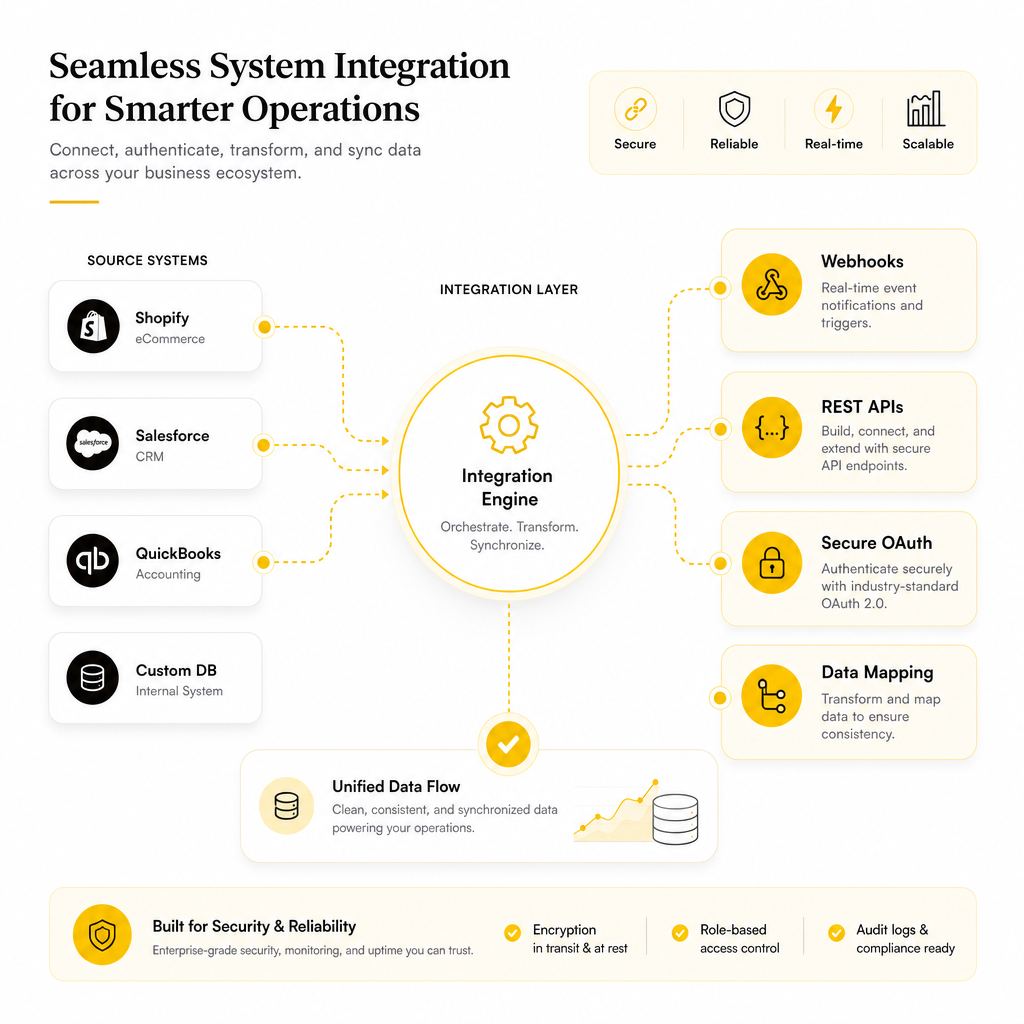
Illustration showing AI automation integration with webhooks, REST APIs, OAuth, and data mapping.

How We Integrate Without Replacing Your Current Systems

The fastest way to improve operations is not to start over—it’s to connect what you already use.

Shakir Ansari – Full Stack Developer & AI Automation Solutions builds custom-coded workflows that integrate via:

  • Webhooks
  • REST APIs
  • Event triggers
  • Secure OAuth connections
  • Data mapping and validation layers

### Where API documentation matters

If integrations are unclear, automation fails quietly. We build around API documentation and structured mappings so the workflow is dependable:

  • Clear request/response formats
  • Field mapping between systems (CRM ↔ tickets ↔ scheduling tools)
  • Error handling and retries
  • Logging and audit trails for traceability

Result: automation that’s maintainable—not fragile.

The Operations Outcomes You Can Expect

When AI automation is implemented correctly, teams typically see improvements in:

1) Faster response times

Automate first response and routing for tickets, inquiries, and requests.

2) Fewer manual workflows

Reduce copy/paste, manual updates, and repetitive admin tasks.

3) Clearer approvals and accountability

Use human-in-the-loop approvals for sensitive steps while automating the rest.

4) Real-time reporting

Generate reports automatically from operational data—daily, weekly, or on-demand.

5) Higher productivity and consistency

Standardize how requests are handled across teams and locations.

Practical AI Automation Use Cases for Operations Managers

Below are common workflows operations leaders automate first because they deliver quick ROI.

Automated Lead & Inbound Request Handling

  • Capture leads from forms, ads, chat, and email
  • Classify intent and urgency using AI
  • Enrich and update CRM fields automatically
  • Create follow-up tasks
  • Send personalized responses or confirmation messages

Result: fewer leads slip through, faster follow-up, cleaner pipeline data.

Customer Support Triage + Agent-Assisted Resolutions

  • Read incoming support requests
  • Identify categories, keywords, and urgency
  • Draft responses or create knowledge-based suggestions
  • Route complex cases to the right team
  • Log outcomes back into ticketing systems

Result: improved SLA performance without adding headcount.

Automated Approvals for Operational Processes

  • Route requests for approval based on rules (amount, department, priority)
  • Require sign-off for high-risk actions
  • Maintain an audit trail of decisions
  • Notify stakeholders automatically and update statuses

Result: approvals move faster while risk stays controlled.

Task Management That Doesn’t Rely on Memory

  • Convert emails and requests into actionable tasks
  • Set due dates and reminders
  • Assign ownership based on workload or category
  • Escalate stalled items automatically

Result: less “where is this at?” and fewer forgotten follow-ups.

Reporting and Operational Dashboards (Without Spreadsheet Hell)

  • Pull data from multiple tools
  • Clean and normalize inconsistent fields
  • Generate recurring reports (weekly ops summaries, staffing metrics, ticket trends)
  • Send reports to stakeholders automatically

Result: reporting becomes a system—not a manual project.

Document Generation for Admin and Operations

  • Generate proposals, summaries, internal memos, and operational documents
  • Populate templates with live data
  • Reduce turnaround time for repetitive documentation

Result: faster documentation with fewer errors.

A Simple Implementation Plan (Built for Ops Reality)

Step-by-step execution that maps to operational reality:
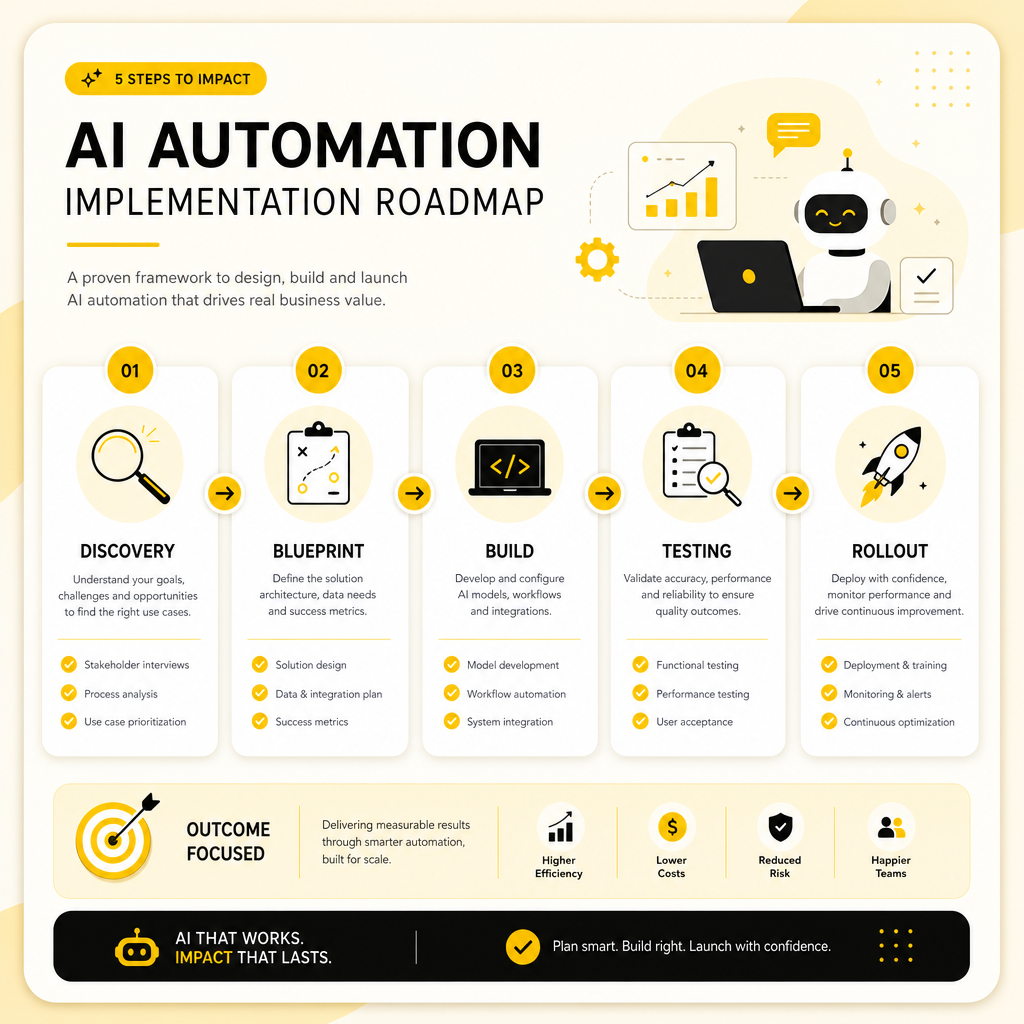
Step 1: Workflow Discovery

  • We map the operational workflow end-to-end:
  • What triggers it?
  • What reporting is needed?

Step 2: Automation Blueprint

  • AI tasks (classification, summarization, routing, drafting)
  • Rules and decision logic
  • Data outputs and reporting formats

Step 3: Build + Integration

  • Validation and normalization
  • Role-based access controls
  • Logging and audit trails

Step 4: Testing + Iteration

  • We test with real examples and refine:
  • Edge cases
  • Escalation paths

Step 5: Rollout + Optimization

  • We monitor performance and continuously improve:
  • Accuracy
  • Operational stability

Illustration showing a five-step AI automation implementation plan with connected stages.

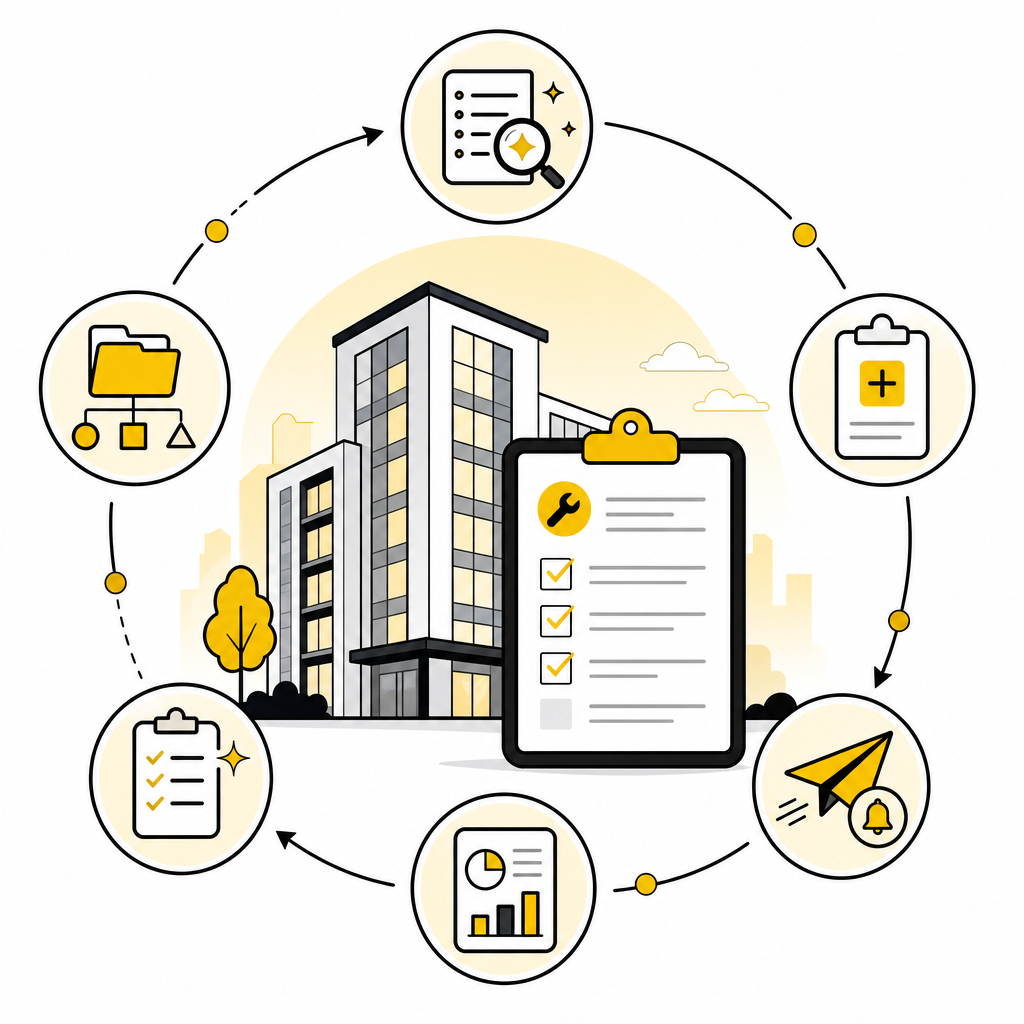
Illustration representing AI automation workflows for facilities and real estate, including maintenance, vendors, checklists, and reporting.

Spotlight: AI Automation for Facilities & Real Estate Teams

For a Senior Facilities & Real Estate Manager, recurring operational work can be automated—especially around request intake, vendor coordination, and documentation.

Examples:

  • Maintenance request intake → auto-categorization + triage
  • Work order creation → tasks assigned + due dates generated
  • Vendor follow-up emails → automated nudges
  • Lease/compliance document summaries → AI-generated checklists
  • Monthly facilities reporting → auto-generated from logs and tickets

Result: faster response to issues and better visibility across properties.

Spotlight: AI Automation for Directors of AI & Automation

A Director of AI & Automation typically cares about:

That’s why Shakir Ansari’s approach emphasizes workflow design, integration quality, and operational reliability—so automation doesn’t break when real-world inputs change.

Why Choose Shakir Ansari’s Team for AI Automation?

With 10+ years of experience and 1,300+ web applications built, Shakir Ansari and the RTP team deliver production-grade automation across:

  • Full-stack development
  • Laravel / PHP
  • React
  • WordPress / Shopify / WooCommerce / Squarespace
  • API integrations and SaaS development
  • Workflow automation and AI agents
  • Custom-coded workflows
  • Operational reliability

Core goal: help businesses save time, reduce manual work, and operate more efficiently by connecting systems and automating the repetitive parts of the job.

Key Metrics Operations Leaders Track

Frequently Asked Questions

Can AI automation work with our existing tools?

Yes. The goal is to connect your current systems using APIs, webhooks, and workflow logic—so you don’t need to replace everything.

Do we need to remove humans from approvals?

Not at all. Many operations workflows use human-in-the-loop approvals for sensitive steps while automating the rest.

How long does it take to automate a workflow?

Timeline depends on complexity and the number of integrations. We start small, prove value quickly, then scale.

What if our API documentation is incomplete?

We can still work with incomplete documentation by testing endpoints, using logs, and building resilient integration layers. The best outcomes come from structured documentation and clear data mapping.

Will AI automation break when requests are messy?

Good implementations include validation, error handling, retries, and escalation paths—so automation remains reliable even when inputs vary.

Get Custom AI Automation for Your Operations Workflows

Stop letting repetitive tasks drain your team.

If you’re an Operations Manager looking to reduce manual work, automate approvals, generate reporting, and connect tools—Shakir Ansari – Full Stack Developer & AI Automation Solutions can build a tailored automation system for your environment.

Contact us to discuss your workflow and get a practical AI automation plan.


Discuss Your Workflow