SHAKIR ANSARI

Workflow Automation for Operations Managers with ML

Operations Managers don’t just need software—they need reliable systems that reduce manual work, connect business tools, and keep operations moving.

With shakiransari – Full Stack Developer & ai automation services and the RTP team, you can automate repetitive workflows, integrate your existing tools, and add Machine Learning where it matters—so teams work faster, with fewer errors.

Less manual coordination and copy-paste work

Faster approvals, routing, and task completion

Automated reporting and real-time visibility

Scalable workflows that grow with your business

Ready to automate?

Contact us

for a workflow automation consultation.

Who this is for (Operations Managers)

This page is for Operations Managers and operations leaders who want to:

  • Reduce time spent on repetitive tasks
  • Connect tools like CRMs, ticketing systems, ERPs, and email platforms
  • Standardize processes across teams
  • Improve internal efficiency with measurable KPIs

Why workflow automation is now a requirement (not a “nice-to-have”)

Most organizations still rely on manual handoffs and spreadsheets when they need an automation layer.

That creates predictable issues:

  • Work gets stuck in inboxes and chat threads
  • Approvals take too long
  • Reporting is inconsistent or delayed
  • Teams repeat the same steps across departments
  • Tool integrations are fragile and break during change

A workflow automation system turns these “people-dependent” steps into consistent, trackable processes.

What a workflow automation system includes

A complete workflow automation setup usually combines:

1) Workflow orchestration (the brain)

  • Triggers (new ticket, new lead, status change, payment received)
  • Rules (when/if/then logic)
  • Routing (assign tasks to the right person/team)
  • Approvals (role-based sign-off chains)
  • Status updates and audit trails

2) Tool connections (the nervous system)

  • API integrations to sync data across platforms
  • Webhooks for near-real-time events
  • Data mapping so teams trust the outputs
  • Error handling and retries

3) Automation interfaces (the workflow experience)

  • Admin dashboards for Operations teams
  • User portals for request submission
  • Role permissions and approval workflows
  • Reporting views and operational KPIs

4) Intelligent automation (where Machine Learning helps)

Beyond “if this then that,” Machine Learning can:

  • Detect patterns and anomalies in workflow outcomes
  • Classify and route requests faster
  • Suggest next steps based on historical resolution data
  • Predict bottlenecks and help prioritize work

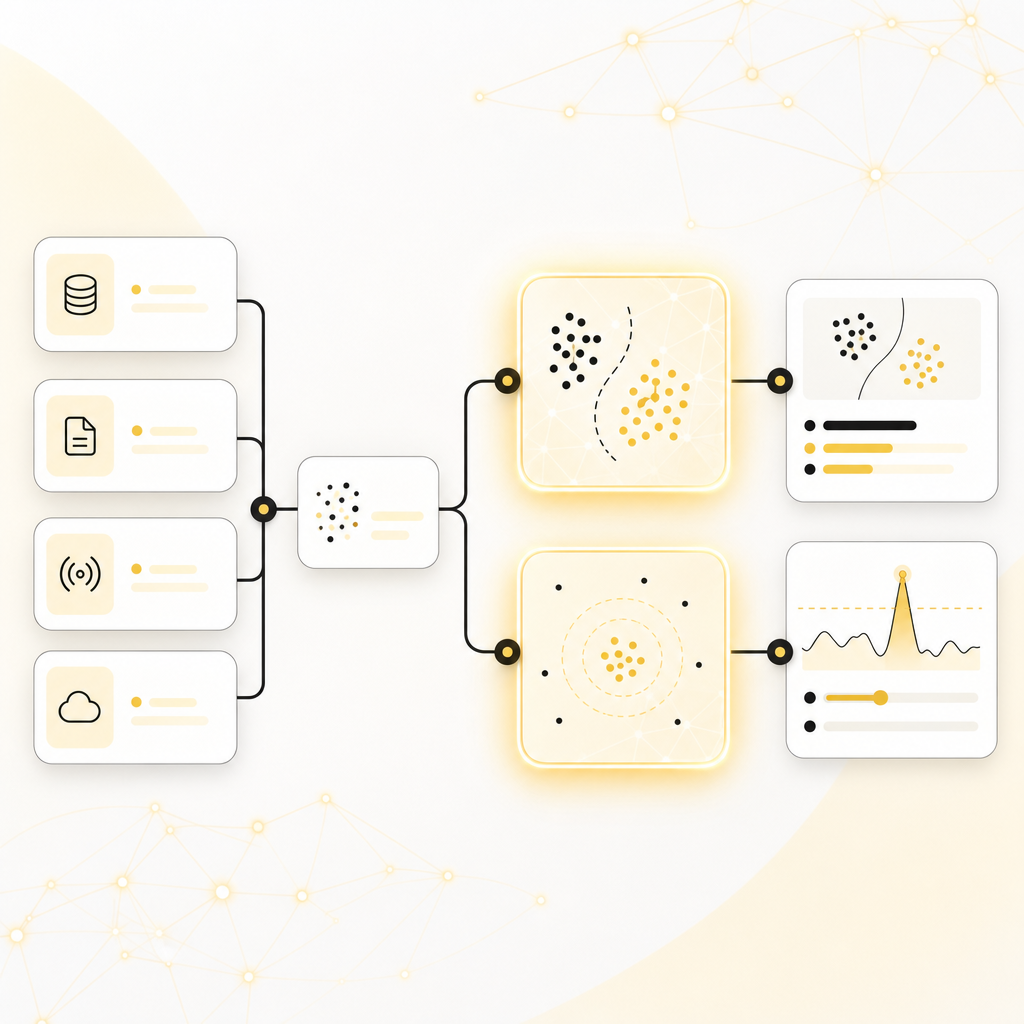
Illustration showing workflow orchestration, tool connections, automation interfaces, and intelligent ML components connected together.

Illustration of Machine Learning-enhanced workflow cards showing classification, anomaly detection, and predicted priorities.

Where Machine Learning fits in (real business value)

You don’t adopt AI just to “use AI.” You use it to improve outcomes.

Common Machine Learning applications in workflow automation:

  • Smart classification: Automatically label requests, tickets, and documents
  • Recommendation routing: Route work to the best queue based on past success
  • Anomaly detection: Flag unexpected delays, failures, or mismatched data
  • Outcome prediction: Estimate resolution time and workload priority

This can be implemented alongside traditional workflow rules—so you get immediate automation benefits and continuous improvement over time.

High-impact use cases for operations teams

Here are common automation workflows we build for business-critical operations:

Lead & request intake automation

  • New inquiries from web forms → auto-enrichment → routing → SLA tracking
  • Auto-create tasks in your system of record

Ticketing and support operations

  • Incoming tickets → categorize → assign → notify
  • Automated follow-ups if tasks stall

Approval workflows for operational change

  • Document or request submission → review chain → decision logging
  • Automated reminders to reduce delays

Reporting and reconciliation

  • Scheduled data pulls from multiple tools
  • Auto-generated reports for daily/weekly operational visibility
  • Exception flags when numbers don’t match expectations

E-commerce and fulfillment operations (where relevant)

  • Order status updates → internal notifications
  • Inventory/order workflow automation connected to your stack
  • Automated returns/refund workflows

How Shakir Ansari & the RTP team build your automation system

We approach automation like a product: designed for operations, built for reliability, and delivered for long-term growth.
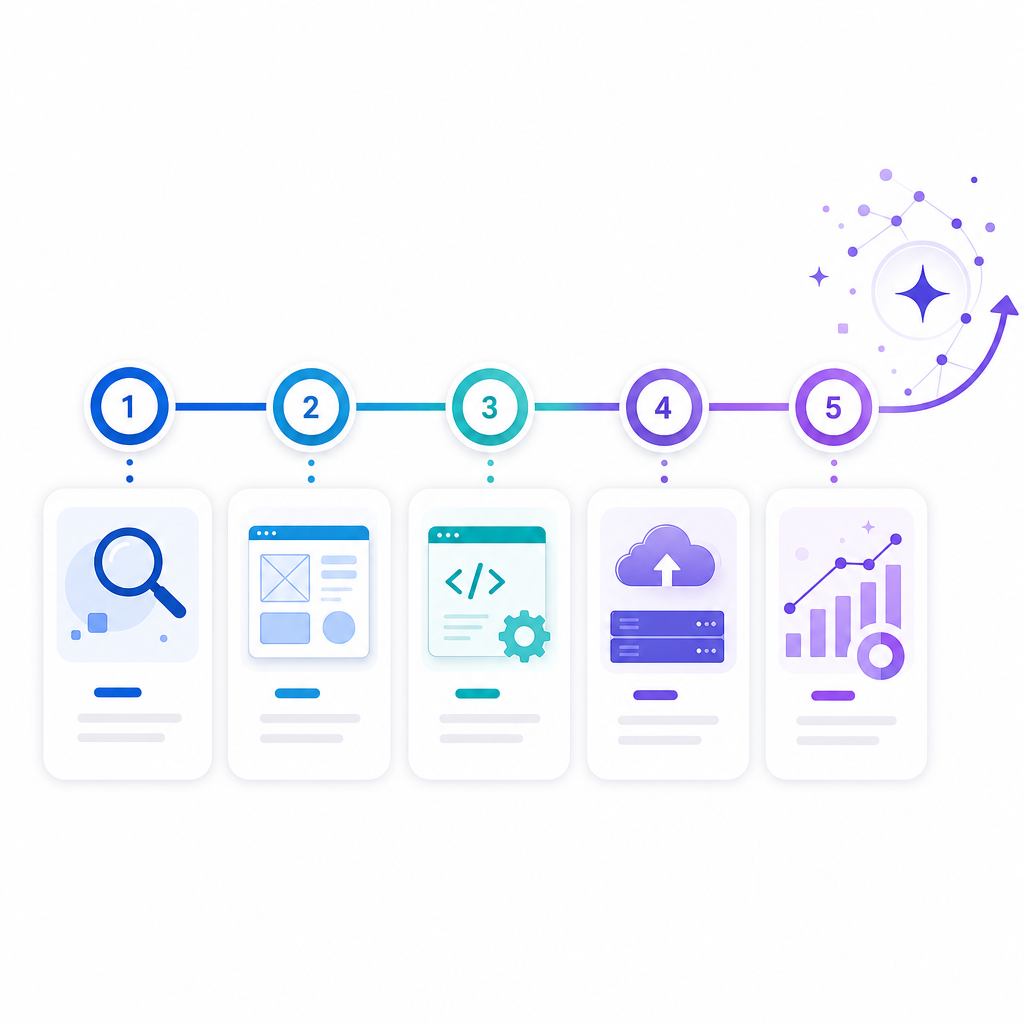
Step 1: Discovery & workflow mapping

  • Understand your current process and bottlenecks
  • Identify systems to integrate and data sources to normalize
  • Define KPIs (cycle time, error rate, SLA compliance, throughput)

Step 2: Solution design

  • Workflow blueprint (triggers, logic, routing, approvals)
  • Integration plan (APIs, webhooks, data mapping)
  • Dashboard and permissions model for operations visibility

Step 3: Full-stack development & automation build

  • Custom web apps and workflow UIs when needed
  • Automation layer and integration services
  • Testing for edge cases and failure scenarios

Step 4: Deployment & rollout

  • Controlled launch (by workflow and team)
  • Training and documentation
  • Monitoring and iteration after go-live

Step 5: Ongoing optimization (and Machine Learning upgrades)

  • Improve rules based on real data
  • Add predictive/ML enhancements when ready
  • Maintain and scale as your business grows

Illustration of a five-step workflow automation build process timeline including deployment and ongoing ML optimization.

Why we’re trusted to deliver reliable automation

This team brings deep technical experience and real delivery volume:

  • 10+ years of experience
  • 1300+ web applications developed
  • Full-stack capabilities across modern web technologies and business platforms
  • Automation-first mindset focused on operational outcomes

Full-service capability (built for digital transformation)

Operations teams need automation—but they also need strong systems around it.

The RTP team can support the full ecosystem, including:

  • Custom websites & web applications
  • SaaS platforms and internal dashboards
  • API integrations and workflow automation systems
  • E-commerce solutions (when workflows intersect with orders/fulfillment)
  • SEO and growth support for modern digital products
  • Mobile apps (optional, for operational teams)

Measurable benefits operations teams typically see

A well-designed automation system can improve:

Faster cycle times
fewer delays between steps

Higher accuracy
reduced manual entry and fewer errors

Better accountability
audit logs and status transparency

More predictable operations
standardized processes and SLAs

Lower operational cost
less time spent on repetitive work

Example project timeline (so you can plan confidently)

Timelines vary by workflow complexity, but many builds follow a similar pattern:

Discovery + mapping
1–2 weeks

Design + architecture
1–2 weeks

Build + integrations
3–8 weeks

Testing + rollout
1–3 weeks

If you’re ready to scale, we can expand automation to additional workflows and teams after the initial success.

Reliability, security, and operational control

Operations workflows must be dependable.

We focus on:

  • Clean, maintainable code and scalable architecture
  • Role-based access and approvals
  • Audit trails for critical actions
  • Error handling for integrations (with safe retries)
  • Monitoring so issues are caught early—not during peak operations

Frequently Asked Questions

Can you integrate with our existing tools?

Yes. We connect via APIs and webhooks, map data correctly, and build robust integration logic so your workflow automation stays stable.

What if we don’t have clean data today?

We design for real-world systems—normalizing data where needed and building checks to reduce downstream errors.

Do we need Machine Learning to start?

No. You can launch workflow automation immediately using rules and triggers. Machine Learning enhancements can be added when you have enough operational data and clear improvement targets.

Will our team be able to manage workflows after launch?

Yes. We create operational dashboards and approval experiences so your team can manage workflows without engineering bottlenecks.

How do we get started?

Contact us to discuss your current process, the tools you use, and the outcomes you want. We’ll recommend the fastest path to measurable improvement.

Ready to reduce manual work and improve efficiency?

If you’re an Operations Manager looking to streamline operations, connect tools, and automate repetitive tasks—with optional Machine Learning upgrades—Shakir Ansari and the RTP team can help.

  • ✅ Custom workflow automation
  • ✅ Full-stack dashboards and operational UIs
  • ✅ API integrations and reliable orchestration
  • ✅ Scalable systems built for growth


Contact us

to schedule your workflow automation consultation.