
SHAKIR ANSARI
Full Stack Developer & AI Automation Solutions (RTP team)

AI Automation for Administrative Teams

Administrative teams often carry the “glue work” of a business: entering data, creating documents, scheduling meetings, sorting emails, updating systems, managing files, and generating reports. It’s essential—but repetitive and time-consuming.

Custom ai automation services helps your team save time, reduce manual work, and operate more efficiently by connecting your existing tools with AI Assistants, workflows, and integrations—without forcing you to replace your current systems.

Built by shakiransari – Full Stack Developer & AI Automation Solutions (RTP team), with 10+ years of experience and 1300+ web applications delivered.

Get a practical AI automation plan tailored to your admin workflows.
10+ years of experience
Building automation that fits how teams actually work

1300+ web applications delivered
Full-stack delivery experience for real integrations

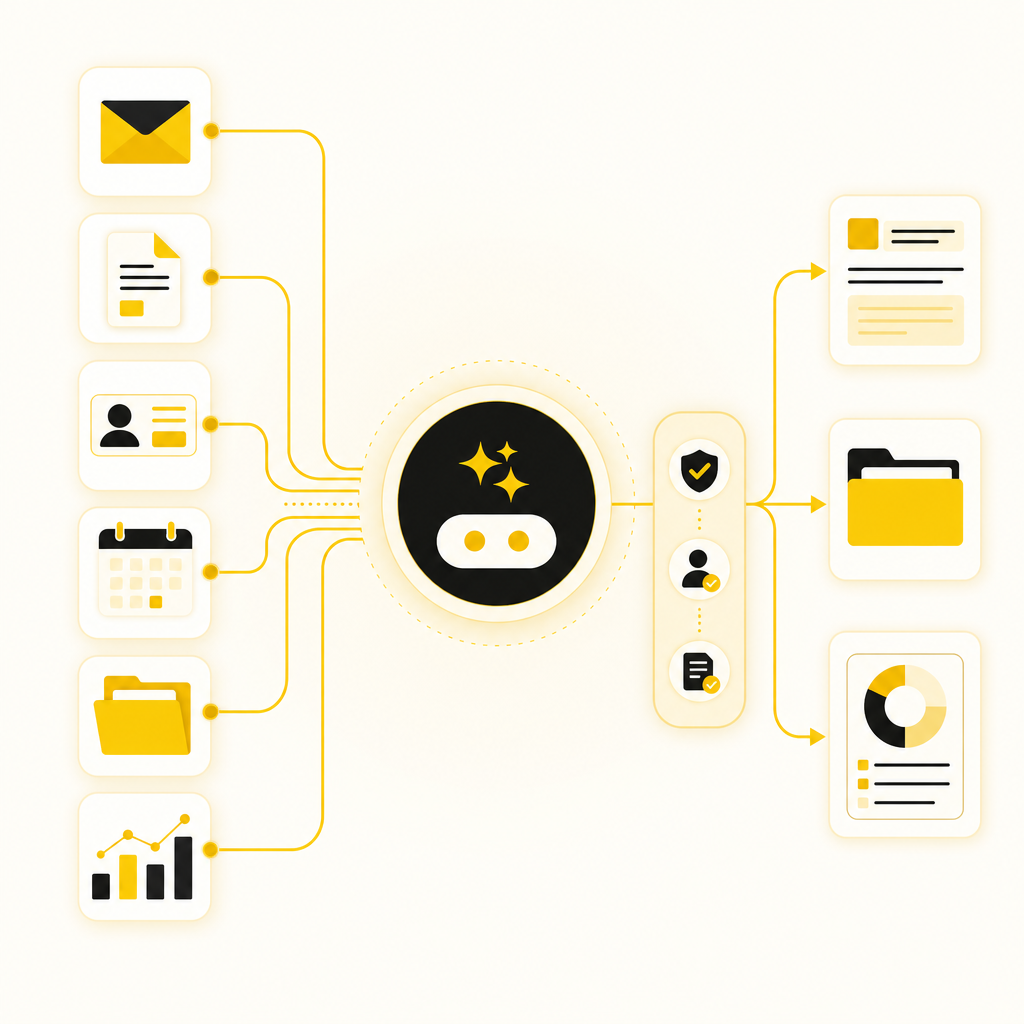
Custom AI automation helps admin teams save time by connecting existing tools with AI Assistants, workflows, and integrations.

Diagram-style illustration showing connected admin workflows powered by AI assistants for emails, documents, CRM updates, scheduling, file management, and reporting.

What AI Automation Means for Administrative Teams

AI Automation uses AI-powered tools, agents, and workflow logic to handle repetitive administrative tasks like:

  • Drafting and generating documents
  • Sorting and prioritizing emails
  • Updating CRMs and internal systems
  • Creating reports from data
  • Processing requests and routing them to the right owner
  • Booking appointments and coordinating schedules
  • Managing files and internal updates

Instead of manually moving information between tools, AI connects systems so information flows automatically—with review steps where needed.

The Real Problem: Repetitive Admin Work Drains Productivity

If your admin team regularly does tasks like the list below, AI automation can remove major bottlenecks:

  • Re-entering the same data into multiple systems
  • Copy/pasting from emails into spreadsheets/CRMs
  • Searching folders for documents and versioning updates
  • Sending follow-ups manually and tracking responses
  • Writing repetitive internal updates and meeting notes
  • Building weekly/monthly reports from scattered sources
  • Scheduling appointments based on availability and confirmations

Result: slower response times, higher error risk, and “busy work” that prevents higher-value tasks.

Why AI Assistants Are Built for Admin Teams (Not Just Chatbots)

AI Assistants can do far more than answer questions. For administrative workflows, the best AI assistants can:

  • Read and summarize incoming emails or tickets
  • Extract structured info (names, dates, amounts, priorities)
  • Draft responses, internal updates, and documents
  • Trigger actions inside your systems (CRM updates, ticket creation, follow-ups)
  • Ask clarifying questions when information is missing
  • Follow a defined process reliably (with guardrails)

Think of it as an AI automation partner for the office, designed to execute your procedures—not just “talk.”

When automation fails, it’s usually not the AI—it’s unclear goals, messy workflows, and weak integrations.

AI Automation Senior Lead: How We Lead Automation from Strategy to Delivery

Our AI Automation Senior Lead approach focuses on:

  1. Workflow mapping (what happens today, step-by-step)
  2. Automation design (where AI helps vs. where rules handle tasks)
  3. Tool integration planning (CRM, email, scheduling, storage, reporting)
  4. Quality controls (accuracy checks, approval gates, auditability)
  5. Deployment + monitoring (so improvements keep working as your business evolves)

This is how admin automation becomes dependable—not experimental.
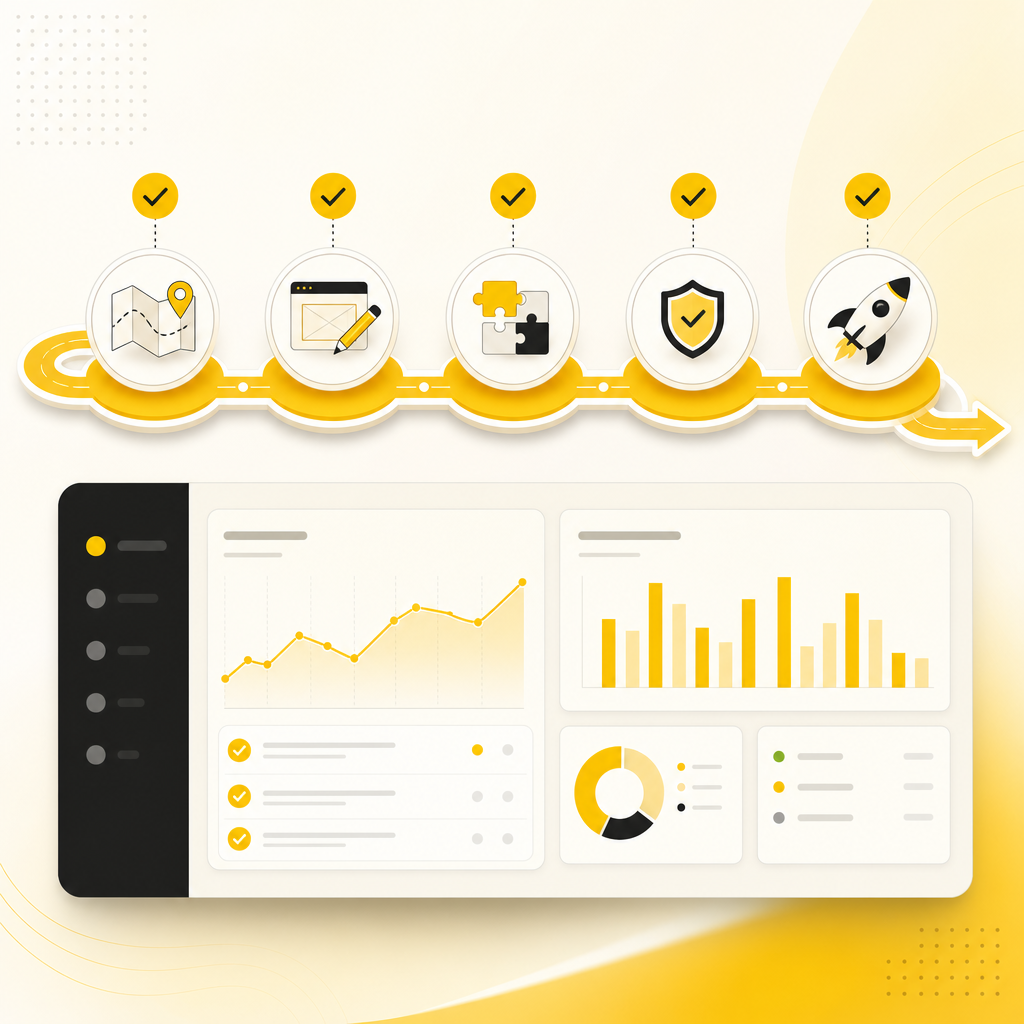
Modern illustration of an automation roadmap from strategy to delivery with workflow mapping, integration, validation, and monitoring steps.

High-Impact Use Cases for Administrative Teams

Below are practical examples of AI automation you can deploy immediately.

1) Lead Handling & Intake Automation

  • Capture lead details from forms, emails, or submissions
  • Extract fields (company, contact, intent, timeline)
  • Create or update records in your CRM
  • Send confirmation emails and route “hot” leads to the right owner
  • Generate a brief summary for follow-up

Outcome: faster lead response without extra data entry.

2) Customer Support & Internal Request Triage

  • AI sorts incoming messages by category and priority
  • Drafts suggested replies based on your policies or knowledge base
  • Creates tickets or tasks when required
  • Requests missing information automatically
  • Tracks and summarizes conversation status for your team

Outcome: quicker response times and fewer missed items.

3) Email Sorting, Follow-Ups, and Response Drafting

  • Classify emails (vendor/customer/lead/internal)
  • Detect action items and due dates
  • Generate follow-up messages with correct context
  • Maintain a log of outcomes and next steps
  • Escalate issues that need human approval

Outcome: less time in inboxes, more consistency in follow-through.

4) CRM Updates, Data Processing, and Field Extraction

  • Read email attachments or structured messages
  • Extract structured data automatically
  • Update CRM fields and tags
  • Flag inconsistencies for review
  • Sync updates across systems to avoid stale information

Outcome: fewer errors and less manual admin overhead.

5) Reporting Automation (Weekly/Monthly Without the Pain)

  • Pull data from connected tools and databases
  • Create clean summaries and charts (based on your metrics)
  • Draft management-ready report narratives
  • Send reports on a schedule to the right stakeholders
  • Highlight anomalies and notable trends

Outcome: reports that happen on time—every time.

6) File Management, Document Generation, and Internal Updates

  • Organize files into the correct folders automatically
  • Generate documents (quotes, proposals, meeting notes, templates)
  • Create versioned outputs with naming conventions
  • Produce internal update summaries for stakeholders
  • Route documents to approval workflows

Outcome: less searching, faster document turnaround, fewer “where is the file?” moments.

7) Appointment Booking & Scheduling Coordination

  • Confirm availability based on calendars
  • Propose time slots and send booking links
  • Create calendar events and internal tasks
  • Send reminders and update stakeholders
  • Capture intake details before meetings

Outcome: smoother coordination and fewer scheduling back-and-forths.

How Custom AI Automation Works (So It Fits Your Existing Stack)

You don’t have to throw away your current tools. Our goal is to automate what your team already does, while improving speed and accuracy.

Step 1: Automation Audit & Workflow Mapping

We identify:

  • Your repetitive tasks
  • Where data is created and where it’s duplicated
  • Bottlenecks and failure points
  • Approval steps that must stay human-controlled

Step 2: Automation Plan (Use Cases + ROI)

We define:

  • What will be automated first
  • What AI will do vs. what rules will enforce
  • Success metrics (time saved, fewer errors, faster turnaround)

Step 3: Build AI Assistants + Workflows

We create:

  • AI Assistants for extraction, summarization, and drafting
  • Workflow automation for routing, triggers, and approvals
  • Integrations between your tools

Step 4: Connect Your Systems with Reliable Integrations

Common connections include:

  • Email workflows (sorting, drafting, follow-ups)
  • CRM updates
  • Scheduling tools
  • Document storage and file management
  • Reporting data sources

Step 5: Testing, Human-in-the-Loop Controls, and Rollout

We ensure:

  • Accuracy and consistency
  • Clear escalation rules
  • Audit logs and review steps where needed
  • Smooth handoff to your admin team

Step 6: Monitor + Improve

After launch, we refine:

  • Prompts and extraction logic
  • Workflow steps and edge cases
  • Reporting quality and schedules

With custom-coded digital solutions, we focus on building automation that’s:

  • Reliable (built for real daily use)
  • Scalable (handles growth without breaking processes)
  • Connected (integrates with your current systems)
  • Secure-minded (guardrails and approvals where needed)

Our team supports automation across modern stacks and platforms, including workflow automation and AI agents, alongside website development and integrations.

Benefits Admin Teams Notice Fast

Within weeks, many teams see improvements like:
  • Reduced manual data entry
  • Faster email turnaround and follow-ups
  • Consistent CRM updates and less missing context
  • Reports produced on schedule with fewer errors
  • More time for high-value coordination and decision support

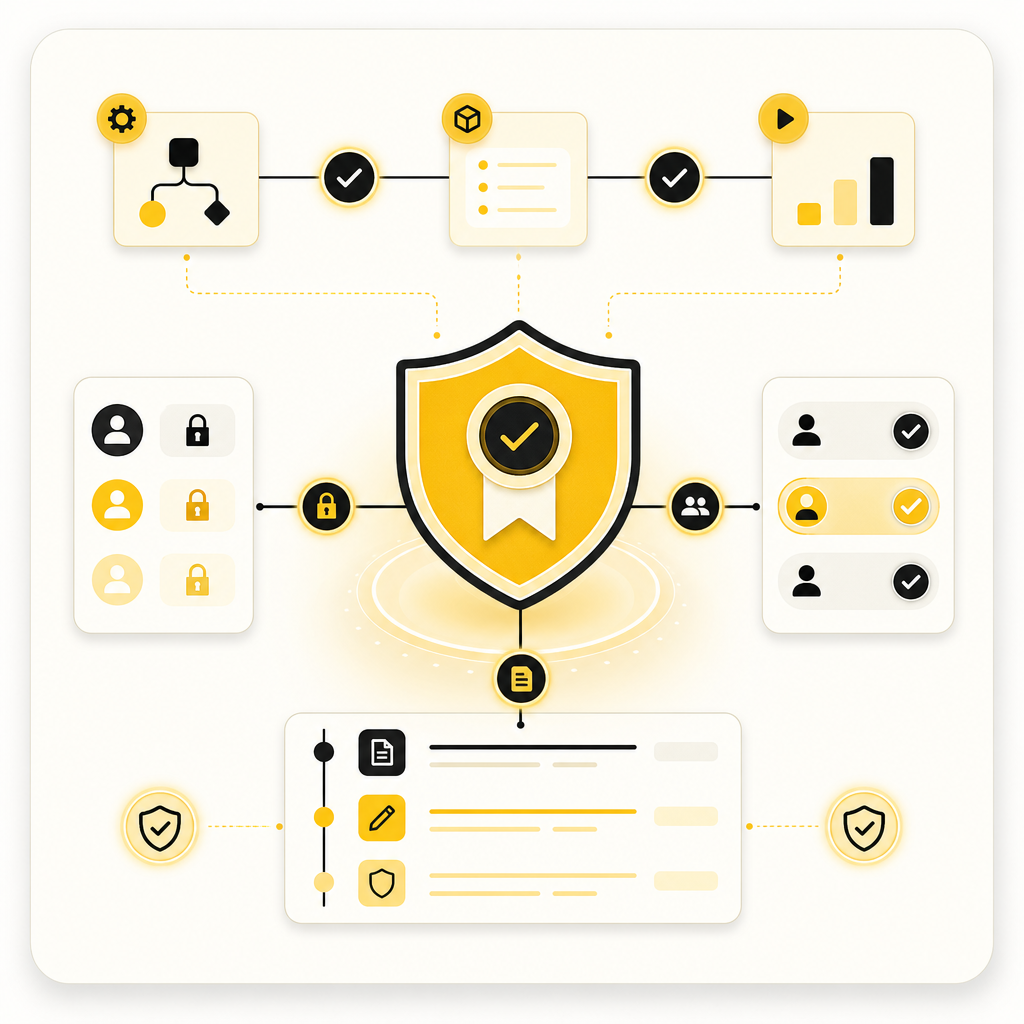
Illustration conveying secure AI automation guardrails with approval checkpoints, audit trail, and validation controls.

Security, Accuracy, and “Don’t Break Our Business” Guardrails

Admin automation touches sensitive information. We design systems with:

  • Permissioned actions (only do what the workflow allows)
  • Human approval checkpoints for critical steps
  • Auditability (trace what happened and why)
  • Validation rules to reduce extraction errors
  • Continuous monitoring to improve performance over time

Frequently Asked Questions

1) Do we need to replace our CRM/email/calendar tools?

No. The goal is to automate and connect what you already use.

2) Will AI Assistants handle tasks without making mistakes?

They can handle many tasks, but we typically add review steps for accuracy where it matters—especially for high-impact actions.

3) What admin tasks are best to automate first?

Start with workflows that are repetitive and rule-based: email triage, follow-ups, document drafting, CRM updates, reporting, and intake processing.

4) How long does implementation take?

It depends on workflow complexity and integrations, but we usually begin with a prioritized automation pilot to show value early.

5) Can you automate reporting and dashboards?

Yes—reporting automation can summarize data, generate recurring reports, and send them on schedules.

6) What if we have messy or inconsistent data?

We build extraction and validation logic and can introduce structured data handling so the workflow improves over time.

Ready to Automate Admin Work (Without Replacing Your Systems)?

If your admin team is spending too many hours on repetitive tasks, custom AI automation can help you move faster and operate more efficiently.

Request an AI Automation consultation with Shakir Ansari – Full Stack Developer & AI Automation Solutions, and we’ll map your workflows to build a practical plan using AI automation services, integrations, and automation workflows.

Let’s turn daily admin work into smarter systems.

AI Automation for Admin Teams

Map your workflows, connect your existing tools, and build reliable automation with review steps where needed.

Request an AI Automation consultation

Built by Shakir Ansari – Full Stack Developer & AI Automation Solutions (RTP team), with 10+ years of experience and 1300+ web applications delivered.